
You’ve published 20, 30, maybe 50 posts. But instead of building on each other, your rankings feel scattered. A few pages pick up some traffic, the rest barely get crawled. And no matter how many new articles you publish, Google doesn’t seem to recognize you as an authority on anything in particular.
Nine times out of ten, that’s a site structure problem.
An SEO silo structure is one of the most effective ways to fix it. By organizing your content into clear thematic groups, you help both Google and your visitors understand exactly what your site is about, and which pages are the most important.
In this guide, I’ll explain what silo SEO is, why it matters, and how to actually build one from scratch (or retrofit one onto a site you’ve already started).
In This Article
What Is an SEO Silo Structure?
An SEO silo structure is a method of organizing your website’s content into clear thematic groups — called silos — where each group focuses on a single topic and all the pages within it are interlinked.
Think of it like a well-organized library. Every book belongs to a section: history, science, fiction. Within each section, related titles are shelved together. You don’t have to wander the entire library to find what you need, and the librarians always know exactly where everything lives.
Your website works the same way. Without structure, your content is a pile of unrelated books on the floor.
The concept goes back to the early 2000s, when SEO pioneer Bruce Clay formalized the idea of “siloing” as a way to help search engines understand website themes. The terminology has evolved, but the principle is the same: organized, interlinked content beats scattered content every time.
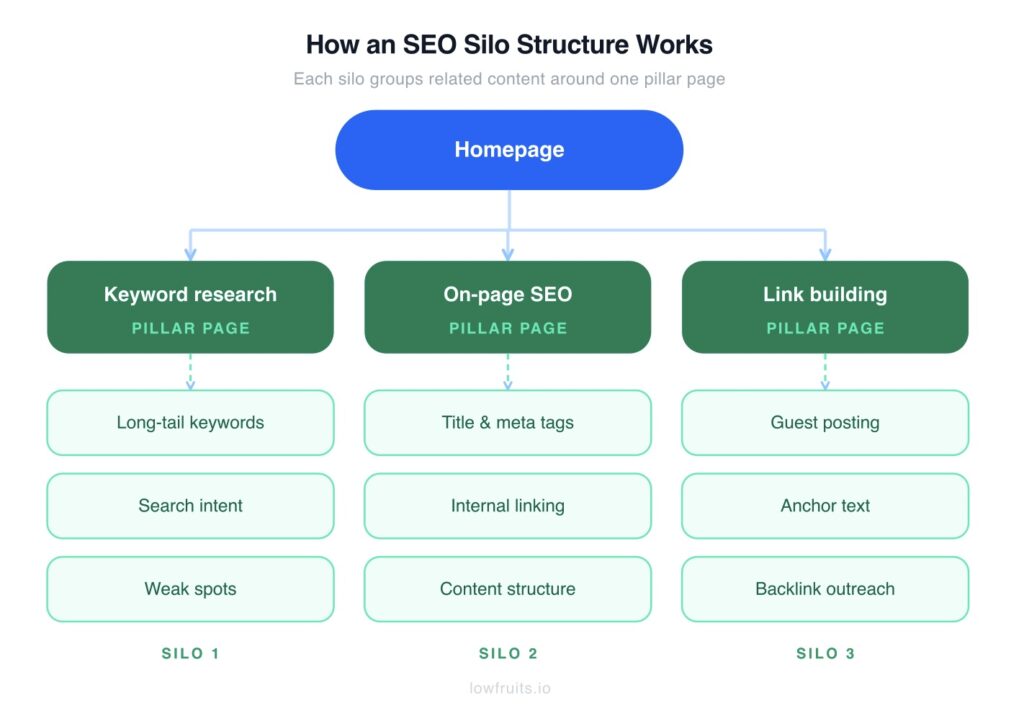
With a silo structure, everything is organized, connected, and easy to navigate — for your readers and for Google’s crawlers. This is how you build topical authority, and Google starts trusting that you’re an expert in your niche.
5 Reasons Why Silo Structure Matters for SEO
The honest version of why this works: Google is trying to figure out whether your site is actually an authority on a topic, or whether you’ve just published a bunch of loosely related posts. Silo structure is how you prove your expertise.
TL;DR: A good silo structure does 5 things for your SEO — (1) it signals topical authority to Google, (2) helps crawlers find and index more of your content, (3) distributes link equity from your best pages to the rest of the site, (4) makes navigation intuitive for visitors, and (5) gives every new piece of content a logical home as your site grows.
1. It Builds Topical Authority
When all your content on a topic lives in the same thematic group and links to itself, you’re not just claiming expertise — you’re demonstrating it through structure. Google can see that you’ve covered keyword research from 12 different angles, not just one. That kind of depth and organization is what builds authority over time.
2. It Improves Crawl Efficiency
Search engine crawlers discover pages by following links. If your site is a mess of unconnected posts, some pages will get crawled regularly and others will barely get touched. A clean silo structure gives crawlers a predictable path through your content, which means more pages get found and indexed.
3. It Directs Link Equity Where It Matters
Link equity is the SEO authority that flows from one page to another through links. When you earn a backlink to one page on your site, that authority doesn’t have to stop there. Internal links carry it to connected pages. A silo structure makes sure that flow is intentional: authority moves from your pillar pages to supporting content and back, rather than pooling on a few lucky pages and going nowhere.
4. It Improves User Experience
This one doesn’t get enough credit. When a reader finishes one of your posts and can immediately see two or three related posts to read next, they stay. Time on site goes up, bounce rate goes down, and Google notices. The SEO benefits of good structure aren’t only about crawlers; they’re about keeping real humans engaged.
5. It Scales With You
This is the one I’d push hardest for anyone building a site from scratch. When your silos are defined upfront, every new post has a clear home. Without structure, you end up with orphan pages (content that exists on your site but isn’t connected to anything), so Google essentially ignores it. A silo structure means that never happens.
The 2 Types of SEO Silos
There are 2 ways to build a silo: through your URL structure (physical) or through your internal links (virtual). Most sites end up using a mix of both.
Physical Silos
A physical silo organizes content through your URL structure. Related pages live in the same directory:
- yoursite.com/keyword-research/
- yoursite.com/keyword-research/long-tail-keywords/
- yoursite.com/keyword-research/keyword-clustering/
- yoursite.com/keyword-research/search-intent/
The parent directory (/keyword-research/) is the pillar page. Everything beneath it is a supporting cluster page.
Physical silos used to be considered essential. The thinking was that URL structure sent a clear signal to search engines about how your content was organized. Google has gotten smarter since then, and most SEO professionals now consider URL-based siloing a nice-to-have rather than a requirement.
If you’re building a new site, set it up this way. It doesn’t cost anything and it helps. If your site already exists and restructuring URLs would break things, don’t bother. Virtual silos accomplish the same goal.
Virtual Silos
A virtual silo creates the same thematic grouping through internal linking alone, regardless of how your URLs are structured. Pages that belong to the same topic cluster link to each other in a way that signals their relationship to Google.
This is the approach most established sites should use. You don’t need to move anything or touch a URL. You just need three things in place:
- Your pillar page links to every supporting cluster page in that silo
- Each cluster page links back to the pillar
- Cluster pages within the same silo link to each other where it’s relevant
The linking pattern is what creates the silo. Google follows those links, maps the relationships, and builds a picture of your site’s hierarchy, even when the URL structure doesn’t make it explicit.
SEO Silos vs. Topic Clusters vs. Content Hubs: What’s the Difference?
These three terms get used interchangeably in most SEO content, which causes more confusion than it needs to. Here’s how they differ:
| Overview | SEO Silo | Topic Cluster | Content Hub |
|---|---|---|---|
| Basic structure | Pillar page + cluster pages | Pillar page + cluster pages | Pillar page + cluster pages |
| Cross-linking between groups | Not allowed (strict) | Allowed where relevant | Freely allowed |
| Internal link philosophy | Keep authority contained within each silo | Link where contextually useful | Link wherever it makes sense |
| Best for | Large sites, strict topical separation | Most blogs & content sites | Brand/editorial sites |
The structure is the same across all three. The only real difference is the cross-linking rule.
SEO silos (in the strict, original sense) keep each topic group isolated. A page in the “keyword research” silo doesn’t link to a page in the “on-page SEO” silo, even if there’s a logical connection. Link equity stays contained within each silo.
Topic clusters and content hubs follow the same organizational logic — pillar page plus supporting cluster pages, all interlinked — but they allow cross-linking between clusters when it makes sense.
Ahrefs has been vocal about this: strict siloing can actually hurt your SEO by cutting off natural linking opportunities. If your post on keyword research genuinely should link to your post on content planning, isolating them in separate silos works against you.
My Take: Think in silos when you’re planning content and mapping keywords, but link like a hub when you’re writing. The original framework is useful. The rigid isolation rule is outdated. Cross-link across silos whenever the connection is genuine, meaning it would help the reader, not just fill out an linking structure.
How to Build an SEO Silo Structure
Here’s how to do this from scratch. If you already have a site with content on it, keep reading. Step 3 has a note specifically for you.
Step 1: Define Your Core Topics
Start by picking 3 to 5 main topics your site will cover. These become the walls of your silos. Choose them carefully, because every piece of content you publish will live inside one of them.
Each core topic should be:
- Broad enough to sustain a silo — you should realistically be able to write 10 or more posts about it
- Narrow enough to be distinct — “marketing” is too vague; “email marketing for e-commerce” is a silo
- Backed by search demand — if people aren’t searching for it, the silo has no foundation
For example, if you run a site about SEO for small businesses, your silos might be: keyword research, on-page SEO, technical SEO, link building, and local SEO. Five clear topics, each with enough depth to support a full cluster of content.
Step 2: Map Your Keywords to Each Silo
Once you have your silos, every keyword you target needs to live in exactly one silo, on exactly one page.
That last part is what most people get wrong. When two pages on your site target the same keyword or the same search intent, they compete against each other in Google. This is called keyword cannibalization. Google can’t tell which page you want to rank, so it often ranks neither well.
The good news is that there’s a simple fix, and it’s called keyword clustering. This process groups related keywords together so you know which ones belong on the same page versus which ones need their own.
You can do cluster keywords manually in a spreadsheet. But from experience, it takes forever and the errors pile up fast.
That’s why I use LowFruits.

LowFruits is a long-tail keyword research tool that analyzes the SERPs and identifies easy ranking opportunities. It’s claim to fame is the “Weak Spots” metric, which highlights weak authority websites ranking in the top 10 search results. These are easy targets that small, or new, websites can beat.

In addition to keyword research, LowFruits has a Keyword Clustering Tool that automatically groups related search queries. This allows you to skip the tedious process of organizing keywords manually, as it does it for you.
To use this feature, just navigate to the Clusters tab of your keyword report. Here, you’ll see a list of main clusters.

You can open any of these clusters to view the individual keywords within that group, along with keyword metrics.

What’s great about this process is that your pre-grouped clusters can map directly onto your SEO silo structure, with search intent already factored in. (Search intent is the “why” behind a user’s search.)
A Test Worth Doing Before You Assume: If two similar-sounding keywords produce noticeably different Google results, they probably need separate pages. If the SERPs look nearly identical, they can usually share a page.
Step 3: Audit Your Competitors’ Structures
Before you start writing, spend an hour looking at how your strongest competitors have organized their content. You’ll often find entire subtopics they’ve handled poorly or ignored completely.
Those gaps are yours to take.
The manual way is to poke around their site and try to piece together their structure. The faster way is to extract their sitemap and read the URL patterns directly. LowFruits’ Sitemap Extractor pulls the full URL list automatically, organized by subfolder, with keywords derived from each slug.
Ten minutes of this work often reveals obvious holes in a competitor’s coverage that would have taken days to spot otherwise.
To use this tool, click “Extract” in the left menu. Then, select the “Sitemap” tab. From here, you can enter up to 15 competitor domains in the search.
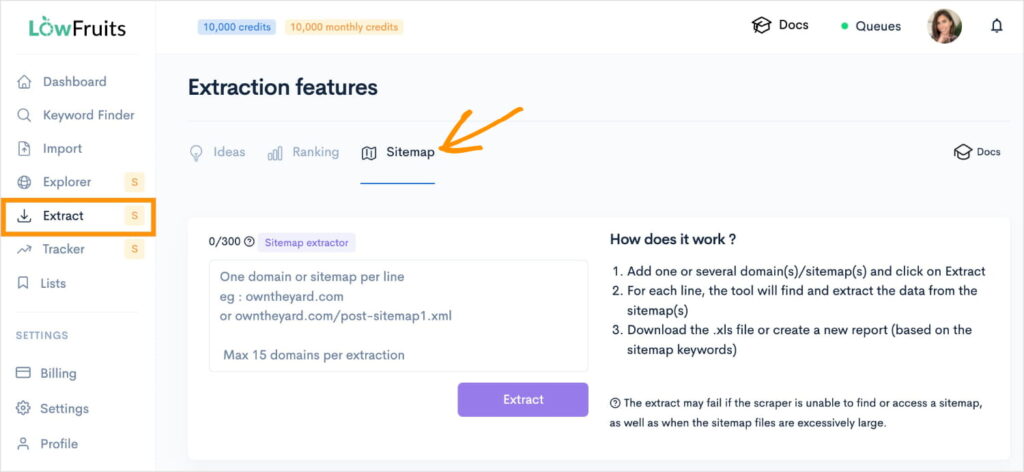
Once you’ve performed a search, your sitemaps will appear at the bottom of the page.
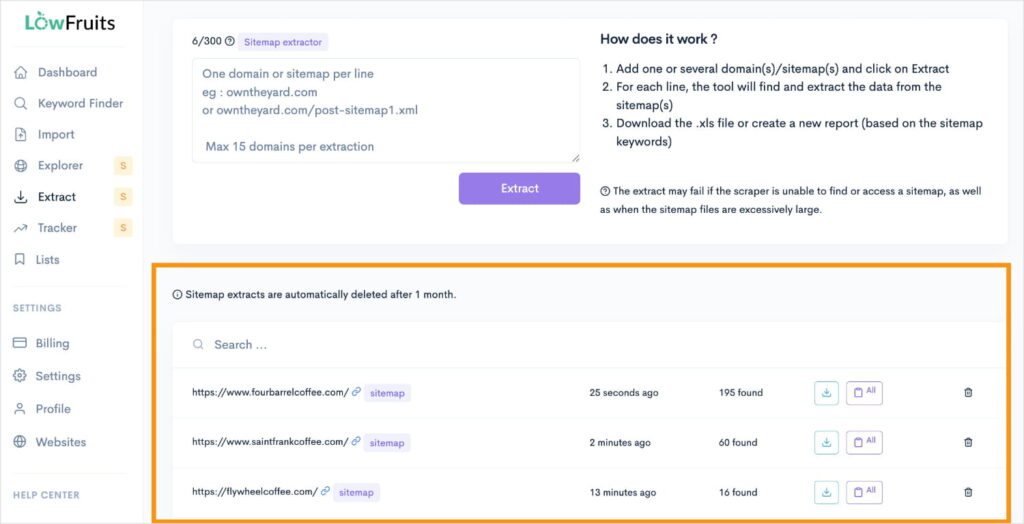
Click the blue download button to the right of whichever competitor’s sitemap you want to view.
This action will download a spreadsheet to your computer with all your competitor’s sitemap URLs. You’ll also be able to see their subdirectories (column B) and sitemap keywords (column C).
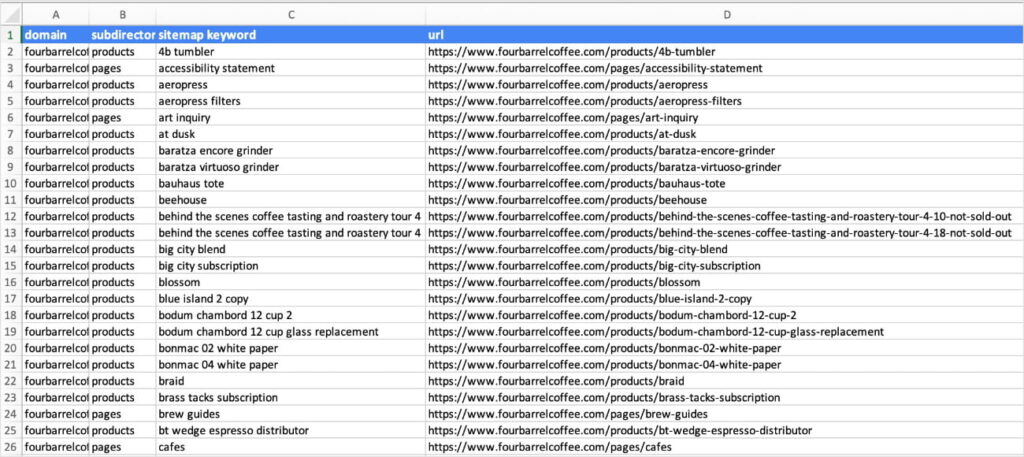
You can use these insights to inform your own SEO site structure and organizational strategy.
If You Already Have a Site: This step is also for you, just pointed at yourself. Export your own sitemap, look at what you have, and start sorting posts into potential silos. You’ll almost certainly find content that doesn’t fit anywhere, content that overlaps with something else, and gaps you didn’t know existed.
Step 4: Build Your Pillar Pages
Each silo gets one pillar page. This is the broadest, most comprehensive page in the silo. It’s the one that gives readers a full picture of the topic and points them toward every related subtopic you cover.
A good pillar page:
- Targets the highest-volume keyword in the silo
- Covers the topic at a high level without going deep on every subtopic (that’s what the cluster pages are for)
- Links to every cluster page in the silo
- Is clearly the “home base” for that topic on your site
Think of it as the table of contents for the silo. A reader should be able to land on it, understand what the silo covers, and navigate to exactly the subtopic they want.
One Thing I See Often: People start publishing cluster content before the pillar page exists, planning to write the pillar “later.” Later never comes, the cluster pages have nowhere to point back to, and the silo never coheres. Write the pillar first.
Step 5: Build Out Your Cluster Pages
With the pillar in place, the cluster pages fill out the silo. Each cluster page:
- Targets a more specific keyword within the silo’s topic
- Goes deeper on one subtopic than the pillar page does
- Links back to the pillar page
- Links to related cluster pages within the same silo
One rule that saves a lot of unnecessary content creation: if a keyword is closely related to an existing cluster page and targets the same search intent, fold it into that existing page rather than creating a new one.
More pages isn’t always more coverage. Sometimes it’s just more competition with yourself.
Step 6: Wire Up the Internal Links
Internal linking is where the SEO value of the whole structure comes together. The architecture on paper doesn’t do anything until the links exist.
Here’s the pattern:
- Pillar → all cluster pages. Your pillar links to every cluster page in the silo — naturally, within the content, not crammed into a list at the bottom.
- Cluster pages → pillar. Every cluster page links back to the pillar, ideally within the first few paragraphs.
- Cluster pages → each other. When two cluster pages are genuinely related, link between them.
- Use descriptive anchor text. The linked text should tell both the reader and Google what they’ll find on the other side. “Click here” and “learn more” are wasted opportunities.
- Cross-silo links are fine. Link between silos when the connection is real and useful to the reader.
Common SEO Silo Mistakes
Even a well-planned silo can go sideways. These are the ones I see most often.
- Silos that are too broad or too narrow. A silo around “marketing” can go in too many directions. A silo around “best marketing tips for first-time small business owners under 30” won’t have enough content to build around. Find a sweet spot, like “small business marketing.” The right size is a topic you can realistically cover with 5 to 20 focused pages.
- Orphan pages. Any page with no internal links pointing to it is invisible to Google. Search crawlers can’t find it, so it doesn’t rank. Every post you publish should belong to a silo and have at least one relevant page linking to it on day 1.
- Starting with cluster content before the pillar exists. It feels more productive to publish a bunch of specific posts first. I get it. But the pillar is what holds the silo together, and without it, your cluster pages are just floating.
- Overlapping silos. If two silos share keyword territory, you’ll end up competing with yourself. Google won’t know which section to trust. Run a keyword clustering check before you finalize your silo structure. Overlaps are much easier to fix before content exists than after.
- Treating the structure as permanent. Your silo structure is a working document, not a final decision. New content needs to be assigned to a silo on the day it’s published. Existing cluster pages need updated links when a new related post goes live. Every few months, check for orphan pages and merging opportunities.
Get the Keyword Foundation Right First
A silo structure is only useful if the keyword research behind it is solid. The wrong keywords in the wrong silos means you’re organizing content that targets the wrong things, and no amount of internal linking fixes that.
Start with the research. LowFruits’ Keyword Clustering Tool automatically groups your keywords, so you can see exactly which keywords belong in each silo. This will help you determine which keywords should share a page before you write a single word.
Then, pair your findings with your competitor’s site structures. You can use the Sitemap Extractor to get this information and the complete list of your competitor’s URLs. Now, you’ll know the gaps in your own SEO site structure before you start.
Ready to get started?
Pick one silo. Build the pillar page. Start filling in the cluster. That’s it. The rest of the structure will follow.
Want to keep learning? These posts are a good next step:
FAQs About SEO Silo Structure
What is a silo structure in SEO?
An SEO silo structure is a method of organizing website content into thematic groups. Each group has one broad pillar page and several supporting cluster pages, all interlinked. It helps search engines understand your site’s hierarchy and strengthens topical authority.
Do SEO silos still work?
Yes, the principle of SEO silos still stands today. What’s outdated is the strict version where content in one silo never links to another silo. Modern silo strategy keeps the organizational structure but allows natural cross-links between groups when the connection is relevant.
What’s the difference between a silo and a topic cluster?
SEO silos and topic clusters have the same structure but different cross-linking rules. Traditional silos keep link equity fully contained within each group. Topic clusters and content hubs use the same pillar-and-cluster setup but allow linking between groups. Most digital marketers use the terms interchangeably today.
How many pages do you need for an SEO silo?
There’s no hard minimum, but an SEO silo with fewer than 5 pages rarely builds meaningful topical authority. Most well-developed silos have 10 to 20 cluster pages around a central pillar. Let keyword research guide you. If there are enough distinct subtopics with search demand, the silo is worth building.
How do I build an SEO silo for an existing website?
Start with a content audit. Group your existing posts by topic, pick one page per group to serve as the pillar, and update internal links so pages within each group are connected. You don’t need to restructure your URLs, a virtual silo built through internal linking works just as well.


