
Most website owners either chase high-volume terms they can’t rank for, or play it so safe with low-competition picks that generate no traffic at all.
After 6+ years of doing keyword research for small business websites, I can tell you there is a keyword sweet spot.
High-volume, low-competition keywords are out there. You just have to know where to look.
In this guide, I’ll show you exactly how to find them — before your competitors do.
In This Article
- What Are High-Volume, Low-Competition Keywords?
- Why These Keywords Are So Valuable
- How to Find High-Volume, Low-Competition Keywords
- Step 1: Start With Seed Keywords
- Step 2: Generate Ideas With a Keyword Research Tool
- Step 3: Filter by SERP Difficulty Score
- Step 4: Sort by Search Volume
- Step 5: Analyze the SERP Before You Commit
- Step 6: Use Question-Based Keywords for Easy Wins
- Step 7: Look for Long-Tail Variations of High-Volume Keywords
- Step 8: Spy on Your Competitors' Keywords
- What KD Score Is Considered "Low Competition"?
- Common Mistakes to Avoid
- Putting It All Together
- FAQs
What Are High-Volume, Low-Competition Keywords?
High-volume, low-competition keywords are search terms that
- Get a meaningful number of monthly searches
- Have few strong websites competing for top rankings
In other words, they’re searches people actually make — and searches you can actually win.
Most keyword research tools measure competition with a keyword difficulty (KD) score. The lower the score, the less competition.

But KD alone doesn’t tell you whether a keyword is worth targeting.
A keyword with a KD of 10 and 20 monthly searches isn’t going to move the needle. That’s why search volume matters just as much as difficulty.
For most websites, the sweet spot is a KD score of 30 or below paired with at least 500 monthly searches. If you’re in a niche with naturally lower search volumes, that volume threshold can drop — but the principle stays the same: you want real traffic potential with a realistic shot at ranking.
KD scores aren’t universal. What Semrush labels “30” may not be equivalent to what Ahrefs or LowFruits shows. That’s why I always recommend going beyond the score and actually analyzing the SERP to see who’s ranking, before committing to a keyword.
Why These Keywords Are So Valuable
Most websites can’t compete for broad, high-volume terms. This is particularly true for new websites or small businesses.
A query like “best yoga mat” might get 100,000 searches a month, but the first page is dominated by well-established retailers, brands with thousands of backlinks, and trusted review sites.
That’s where keywords with high search volume and low competition come in. You’re looking for terms that:
- Drive real traffic, not trickles from ultra-niche phrases
- Are actually winnable because the competition is weak, not just scarce
- Convert well because searchers with specific intent are usually closer to taking action.
There’s also a snowball effect to ranking for these keywords. When your pages start appearing on page one, Google takes notice. That makes it easier to rank for more competitive terms over time.
How to Find High-Volume, Low-Competition Keywords
The process isn’t complicated, but it does require the right tool and a few key filters. Here’s how I do it, step by step.
Step 1: Start With Seed Keywords
Every keyword research process starts with seed keywords. These are broad terms that represent your core topic or business. You enter them into your keyword research tool of choice to get additional keyword ideas.
For this first step, write a list of words and phrases that relate to your business. Don’t overthink it. You just need a handful of ideas to feed into the keyword research tool.
If you run a florist shop in Los Angeles, your seed keywords might be:
- “florist Los Angeles”
- “LA wedding flowers”
- “flower delivery 90210”
I like to type mine out in a Google doc, but any word processing platform or spreadsheet will work. You can even do old school pen and paper if that helps you think more creatively.
Step 2: Generate Ideas With a Keyword Research Tool
In this step, we’re going to expand our seed keywords into hundreds or thousands of related terms. We’ll also get search volume and competition data you’d never be able to gather on your own.
There are plenty of options out there, but I use LowFruits when searching for high-volume, low-competition keywords.

Most keyword tools give you a difficulty score and leave you to figure out the rest.
LowFruits goes a step further: it analyzes the SERPs for each keyword and flags where low-authority websites are ranking in the top 10. These domains are called Weak Spots.

This makes it much faster to find keywords that are both high-volume and genuinely winnable, without manually checking dozens of search results yourself.
Now, let’s run through the keyword research process itself in LowFruits.
To get started, head to the KWFinder tab and enter one of your seed keywords. Then, set your location and language and click “Search“.

LowFruits will ask you how you want to view your keywords.
The first option gives you access to all keywords but doesn’t analyze them automatically. (You can select which keywords you want to analyze once you’re in the report, though.)
The second option gives you access to all keywords and analyzes high-intent keywords. These are keywords with strong purchase intent.

Good to Know: LowFruits uses a credit system to analyze keywords in SERPs. Each keyword analyzed = 1 credit. When you select the second option (analyze high-intent keywords), it will tell you how many credits it costs.
Once you’ve made your selection, you’ll get a keyword report that looks like this:

Now, this is where more keyword research tools stop. They give you a list, and you’re left to wade through it manually.
But not with LowFruits. Let’s run through how it works differently from most tools.
Step 3: Filter by SERP Difficulty Score
Instead of just showing you a KD score based on backlinks, LowFruits assigns a SERP Difficulty (SD) score based on what’s actually ranking on page one. It’s on a scale of 1 to 3, with 1 being the easiest and 3 being the hardest.
When you combine this metric with Weak Spots, you get a much better idea of what keywords are attainable.

Now, what I recommend doing is using the SD filter to narrow down your list and find low-competition keywords.
To do this, click the SD filter at the top of your report. Then, set the maximum to 1 and click “Apply.”

This is the key insight: a keyword can have a low KD score but still be hard to rank for if all the top results are from high-authority domains. Conversely, a keyword with a moderate KD score might actually be easy to win if several weak sites are ranking for it.
This will condense your report to keywords with low difficulty only.
Pro Tip: I like to set a filter for Weak Spots, too. Typically, I set the minimum to 2 or 3. I do this because the more Weak Spots there are, the easier it is to rank in the top positions.

Step 4: Sort by Search Volume
Once you’ve filtered for low SD scores and Weak Spots, sort your results by the Vol. (Volume) column in descending order. (Just click the “Vol.” column header to sort.)

This puts the highest-traffic opportunities at the top, so you’re looking at the best combination of high-search-volume, low-competition keywords.

Pro Tip: Don’t dismiss keywords with 10–50 monthly searches too quickly. These low-volume keywords often have strong buying intent, which means these visitors are more likely to convert than someone who searched a broad, informational query.
Step 5: Analyze the SERP Before You Commit
Before you decide to target a keyword, click “View the SERP” inside LowFruits to see the actual top-10 results.

LowFruits pulls live rankings from Google so you have instant access to SERPs, without having to open a new tab and performing a manual Google search. This is a huge time-saver when you’re analyzing multiple keywords.

When you’re in this view, look for:
- Low-authority sites in the top 5 — a strong sign the keyword is genuinely winnable
- Thin or outdated content — if the top results are short or stale, you can outrank them with a well-optimized, comprehensive piece
- Forums, Reddit threads, or Quora pages ranking — these are classic Weak Spots that signal the SERP has room for quality content
If the top 10 results have websites with a combination of these features, that’s your green light that it’s a good term to target.
Step 6: Use Question-Based Keywords for Easy Wins
Question keywords (phrases that start with “how,” “what,” “why,” or “can”) are a reliable source of high-volume, low-competition opportunities.
Why?
Because many of them appear in People Also Ask boxes and featured snippets, which means you can win prominent SERP real estate even without ranking #1. They also tend to have lower KD scores because fewer sites are actively optimizing for conversational queries.
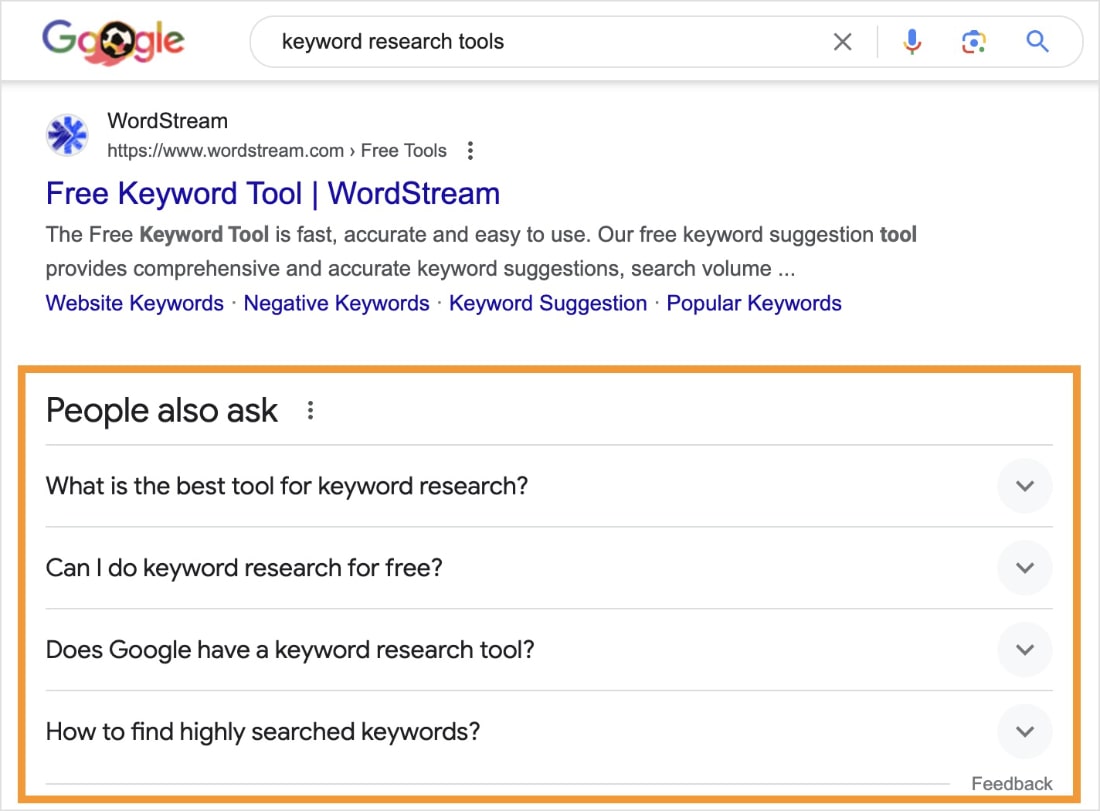
In LowFruits’ KWFinder, you can filter by question keywords to surface these opportunities fast. Just click the Questions tab at the top of your report.

Step 7: Look for Long-Tail Variations of High-Volume Keywords
Long-tail keywords are phrases of 3+ words that are more specific than general, broad terms. They almost always have lower competition and often include a high-volume keyword right in the middle of the phrase.

They also attract users with a clear search intent, which translates to better conversion rates.
Here are some examples:
| Short-Tail Keyword (High Competition) | Long-Tail Keyword (Low Competition) |
|---|---|
| “flower delivery” | “same-day flower delivery Los Angeles” |
| “yoga mat” | “best yoga mat for bad knees” |
| “keyword research” | “how to do keyword research for a new blog” |
Step 8: Spy on Your Competitors’ Keywords
One of the fastest ways to find high-volume, low-competition keywords is to look at what your competitors are already ranking for. Then, identify which ones have Weak Spots you can exploit.
In LowFruits, navigate to the Extract tool and select Ranking. Enter a competitor’s URL, and LowFruits will generate a report of their top-ranking keywords.

Once your report is ready, it will appear lower on the page. You’ll have 3 options for how to view it:
- Download a spreadsheet of all the ranking keywords to your computer.
- Generate a report in the LowFruits KWFinder of keywords in the top 10 search results.
- Generate a report in the LowFruits KWFinder of keywords in the top 100 search results.

If you choose the second or third option, you can apply the same SD and volume filters to surface the winnable, high-traffic opportunities.
And there you have it!
You have an easy process for finding high-search-volume, low-competition keywords in one tool.
What KD Score Is Considered “Low Competition”?
This depends on your website’s current authority, but here are general guidelines:
- KD 0–20: Very easy. Even brand-new sites can rank with well-optimized content.
- KD 21–40: Manageable. Good for sites with some established authority and a few backlinks.
- KD 41–60: Moderate. Requires stronger content, some backlinks, and domain authority.
- KD 61+: Difficult. Best left for well-established sites with strong link profiles.
Remember: Always check the actual SERP alongside the KD score. A keyword with KD 45 might have multiple weak, low-authority sites in the top 5. This would make it an easier win the KD score suggests alone.
Common Mistakes to Avoid
Even with the right tool, keyword research can go sideways fast. These are the mistakes I see most often, and the ones that’ll cost you the most time if you don’t catch them early.
- Relying only on KD scores: KD is a starting point, not a verdict. Always look at who’s actually ranking before you decide whether a keyword is worth targeting.
- Ignoring search intent: A keyword with high volume and low competition is worthless if you can’t match what the searcher actually wants. Check the SERP to understand intent before creating content.
- Skipping low-volume keywords: Don’t assume a keyword with 50 monthly searches isn’t worth your time. High-intent, low-volume keywords often convert at far higher rates than broad, high-volume ones.
- Targeting too broadly: If you write a post trying to rank for a head term like “SEO tips,” you’re competing with every SEO blog on the internet. Narrow your focus to a specific angle — “SEO tips for new Etsy sellers,” for example — and you’ll find much weaker competition.
Putting It All Together
Finding keywords with high search volume and low competition isn’t about stumbling onto a magic list. It’s a process. Start with seed keywords, expand with a keyword research tool, narrow down your list by difficulty, and check search intent by looking at SERPs.
LowFruits is built specifically for this workflow. It cuts out the manual SERP analysis that makes keyword research so time-consuming. This helps you find the best ranking opportunities that will actually put you in the top search results.
If you want to give this process a try yourself, sign up for LowFruits today. It has a 100% money-back-guarantee. Although, you might be surprised how many high-volume, low-competition keywords are hiding in your niche!
FAQs
What are high-search-volume, low-competition keywords?
High-search-volume, low-competition keywords are search terms that a lot of people look up but few strong websites compete for. That combination gives you promising traffic potential and a realistic shot at ranking.
What KD score is considered low competition?
A KD score of 30 or below is a good starting point for most sites. That said, it depends on your domain’s authority. You should always check the actual SERP too. Keyword difficulty alone doesn’t tell the full story.
How do I find high-search-volume, low-competition keywords?
Start with a keyword research tool like LowFruits. Enter a seed keyword, then filter by keyword difficulty and sort by search volume. You want to focus on keywords that have decent search volume and weak websites ranking for them. These terms will easier to win, putting your website higher in search results.
What is a Weak Spot in LowFruits?
A Weak Spot is a low-authority website ranking in the top 10 results for a keyword. It signals that the SERP hasn’t been claimed by strong competitors yet, making the keyword more “winnable” for smaller or newer sites. LowFruits identifies Weak Spots automatically in every keyword report.


