
Have you ever spent hours creating a perfect web page, only to publish it and find out you have another page on your site ranking for the same keywords?
This unwelcome surprise is known as keyword cannibalization, and it’s a common problem in SEO.
Keyword cannibalization occurs when multiple pages on your site compete for the same search queries. This dilutes the SEO efforts of each page, making it harder for either URL to rank in Google search results.
The good news is that fixing it isn’t nearly as scary as the name suggests.
And over the past 6+ years, I’ve developed a reliable system to prevent keyword cannibalization from the start.
In this guide, you’ll learn exactly how to stop keyword cannibalization in its tracks and improve the visibility of your content without competiting against yourself.
In This Article
What Is Keyword Cannibalization?
Keyword cannibalization happens when multiple pages on your website compete for the same search query.
For example, imagine you have an eCommerce website for shoes. You’re trying to sell “red shoes,” but you have 3 different pages:
- “Red Shoe Collection”
- “Best Red Shoes of 2025”
- “Red Shoes for Women”
These pages are all competing for the same keywords (“red shoes,” “red shoes for women”). This dilutes your on-page SEO efforts and creates an internal competition among your own web pages.
Google also struggles to determine which of your pages is the best answer for a searcher’s query. This can lead to lower rankings for all of your pages, and lost traffic.
What Causes Keyword Cannibalization?
There are typically 2 main causes of keyword cannibalization: (1) expanding content and (2) a poor keyword strategy.
Let’s look at each in more details.
1. Expanding Content: Natural Topic Overlap
As your website grows and addresses more related topics, overlap happens. It’s not inherently bad, but addressing it is key. This can happen when a single topic is covered with varying perspectives.
- Example: The bakery expands content from “Red Velvet Cupcakes” to “Red Velvet Cupcake Recipes” and “Red Velvet Cupcake Decorating Ideas.” While related, each page should uniquely answer unique search intent.
- Contributing Factors: New content creation, broad topic choices, or addressing similar questions in an ad-hoc manner.
- Solutions: Careful content planning, topic clustering, and thorough keyword research.
2. Poor Keyword Strategy: Lack of Planning
Without a clear keyword strategy, overlapping search terms can easily happen. This is particularly true if you have a team of writers are working independently or are not in sync with everyone’s SEO efforts.
- Example: Multiple authors create pages without a central planning process, resulting in similar keywords and overlapping content.
- Contributing Factors: No keyword blueprint, ad-hoc content creation, or misaligned content assignments.
- Solutions: Conduct thorough keyword research, create a content blueprint, and align content assignments.
Addressing the root cause helps prevent and solve the underlying problems surrounding keyword cannibalization
Why Is Keyword Cannibalization Bad for SEO?
Discovering keyword cannibalization is frustrating, but understanding why it’s detrimental to your SEO is key to prioritizing a solution.
Here’s a breakdown of the main issues:
1. Confuses Search Engines
The core issue is confusion. Google’s goal is to deliver the most relevant result for each search query.
When multiple pages compete for the same keywords, Google struggles to determine which of your pages best answers a searcher’s intent.
This dilutes your overall ranking potential for that keyword.
2. Wastes “Link Equity” (aka Link Juice)
Each page on your website has a limited amount of “equity”—think of it as voting power.
When multiple pages compete for the same keywords, they essentially divide that equity, rather than focusing it on a single, authoritative page.
This reduces the ability for content to build topical authority.
3. Reduces Ranking Potential
Because of the confusion and wasted equity, cannibalization leads to lower rankings for all involved pages.
Rather than having one page on the first page of Google, you may have multiple pages on pages 2, 3, or even beyond.
With 75% of website traffic coming from page 1, you can expect limited performance.
4. Decreases Crawl Budget
Google’s crawl budget is a limited number of pages it will index on a website.
If several pages are competing with one another, Google must spend more resources crawling duplicate content instead of discovering other, unique content on your website.
This makes it harder for search engines to find and index what could be some of your most valuable content.
5. Creates a Poor User Experience
Because of the issues above, Google may serve a URL you don’t necessarily want to rank in search engine results pages (SERPs).
This means a user is going to land on this page, and it might not be the experience you intended to provide.
Furthermore, if the page doesn’t align with search intent (aka, what the user want to see or achieve), you’ll experience increased bounce rates. This engagement metric is a Google ranking factor, which could lead to a drop in rankings when the bounce rate is high.
The good news is that the consequences of keyword cannibalization can be remedied. But addressing it requires a strategic approach and a few SEO best practices to prevent it altogether.
How to Prevent Keyword Cannibalization Before It Happens
The best way to solve keyword cannibalization is to prevent it from the start. A few simple steps in your content planning process can save you countless hours of work down the road.
Step 1: Do a Quick Rank Check Before You Write
Before you start creating new content, check if you already have a page ranking for your focus keyword.
You can do this with a keyword research tool like Semrush or Google Search Console (GSC).
Here’s how you’d do this in Semrush:
First, enter your website in the Domain Overview tool.
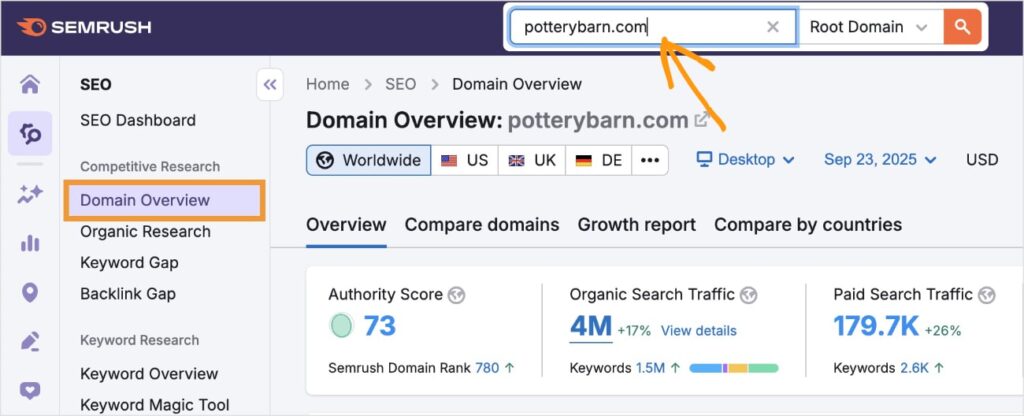
Then, scroll down until you see Organic Research. Click the View Details button.
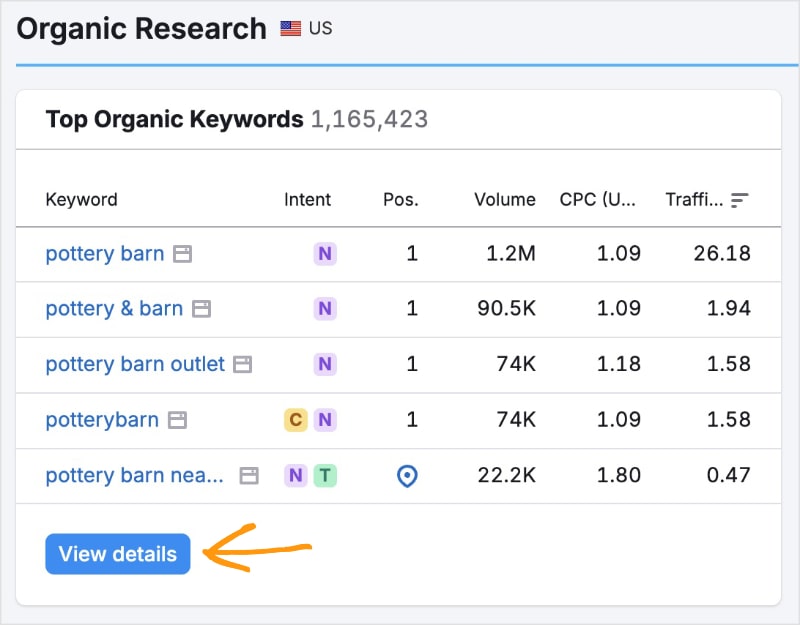
This action will open a new page that shows your website’s keyword rankings. Now, since we want to look for a specific keyword, we’re going to use a filter.
Enter the keyword you’re checking into the box labeled “Filter by Keyword.”
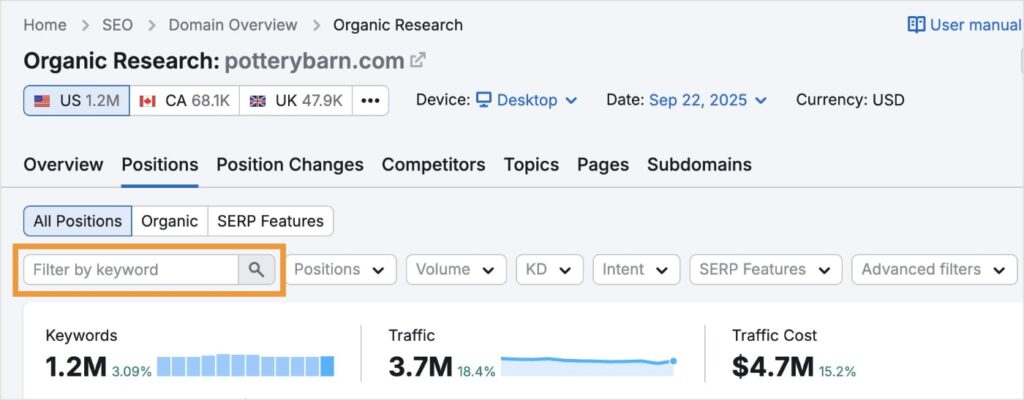
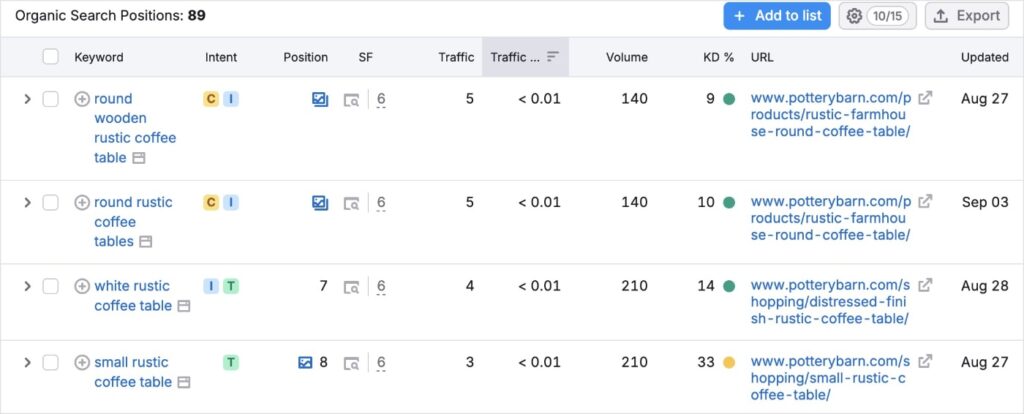
For our example, I used “rustic coffee table.”
Semrush found 89 ranking keywords related to my query. This means the website has covered the topic really well and I wouldn’t want to create keyword cannibalization by making even more content on it. (That is, of course, unless I identified a related keyword with unique intent.)
Don’t have a Semrush account? You can also check if your website is ranking on Google by performing a quick search in Google itself. Just type site:yourwebsite.com “your keyword” in Google and see if it returns any results. This a fast, free way to do a ranking check.
Ultimately, if you find an existing page ranking for the term, you should either optimize that page or, if the content is completely different, build a proper internal linking structure to differentiate them.
Step 2: Map Out Your Content & Keywords
Create a content blueprint or spreadsheet that clearly lists:
- Each URL
- Its primary keyword
- The main search intent
This helps you and your team stay organized and avoids creating overlapping content.
For example, a content map for the “red shoes” site might include pages for:
- URL: /red-shoes-for-women/
- Primary Keyword: red shoes for women sale
- Intent: Transactional (user wants to buy)
- URL: /red-shoes-for-running/
- Primary Keyword: best red running shoes
- Intent: Informational/Commercial (user wants to research and then buy)
This strategy ensures you’re targeting all relevant keywords to your product but align each URL with that specific query’s intent.
Step 3: Create Topic Clusters
Organize your content into logical clusters with a central “pillar” page for a broad topic and supporting pages for more specific, long-tail keywords.
Then, use internal links to connect related pages.

This process is known as topic clustering, and it clearly signals to Google what content is most authoritative.
It also helps you avoid overlap by ensuring every new page has a unique purpose.
Follow this tutorial to learn how to build topic clusters.
You can create topic clusters manually in spreadsheets, but it takes a lot of time. (Trust me, I can’t tell you how many hours I spent in Excel before keyword clustering tools were a thing.)
Luckily for you, LowFruits automates the entire process of keyword clustering.

LowFruits is the best keyword research and SERP analysis tool for small business owners because it focuses on finding low-competition keywords you can easily rank for.
It uses exclusive metrics, like Weak Spots, to identify low-authority competitors ranking in the top positions. (These are competitors even new websites can outrank with the right content.)
It also has a powerful Keyword Clustering Tool that’s simple enough for beginners but with insights that SEO professionals use.
Here’s a brief overview of how it works:
After performing a seed keyword search in the KWFinder, you’ll get a keyword report of related terms.

From here, click on the Clusters tab in the top menu.

This will bring you to a new page that clusters your keywords automatically. You’ll see the main cluster keyword in the far-left column and a preview of how many keywords are within that cluster to the right.
Click on any of the main cluster keywords to view the individual queries within that group.

Remember: The main idea behind keyword clustering is to target semantically-related queries on the same web page to increase its visibility in SERPs.
By using the LowFruits Keyword Clustering Tool, you can do what used to take me days —in seconds.
And not only is the process extremely fast, but it sets you up for success and prevents keyword cannibalization in your content.
How to Fix Keyword Cannibalization in 4 Steps
If you’ve already found pages competing against one another, don’t panic! You can fix it with this simple, 4-step process.
Step 1: Identify the Cannibalizing Pages
The first step is to find the pages that are competing. You can do this by using a keyword position checker to see which URLs are ranking for the same target keywords. A quick Google search with the site: operator can also help: site: yourwebsite.com “your keyword”.
The first step is to find the pages that are competing. This can be done in a few different ways:
- Using a Keyword Position Checker: In a paid tool like Semrush or Ahrefs, your rank tracking report will show you which of your pages are ranking for a given keyword. You can easily spot cannibalization when multiple URLs are listed for the same term.
- Using Google Search Console: Head to the Performance report in GSC and filter by the keyword you suspect is being cannibalized. Then, click on the “Pages” tab. If you see multiple URLs with impressions for that single keyword, you have a problem.
- Manual Site Search: In Google, type site: yourwebsite.com “your keyword“. This will show you all the pages on your site that Google has indexed for that exact keyword. If you see more than one, it’s a strong indicator of cannibalization.
Step 2: Decide on Your Canonical Page
Once you’ve identified the competing pages, you need to choose one to be the main, authoritative page for that keyword. This is the page you want to rank.
Look for the page with the highest:
- Organic Traffic: Which page is already attracting the most clicks from search engines?
- Backlinks or Page Authority: Which page has the most backlinks or the strongest authority metrics from tools like Moz or Ahrefs?
- Content Quality and Freshness: Which page has the most comprehensive, up-to-date, and well-written content that best serves user intent?
- Conversion Rate: Which page is the most valuable for your business in terms of conversions, sales, or lead generation?
Step 3: Resolve the Other Pages
Now it’s time to fix the competing pages. You have 3 primary options:
- Merge: This is often the best solution. Take the best, most valuable content from the weaker pages and add it to your canonical page. This makes your main page even more comprehensive and authoritative. Once you’ve done this, set up a 301 redirect from the weaker URL to the canonical one. This redirects any traffic or backlinks from the weaker page to your new, stronger page.
- Repurpose: If a competing page serves a different search intent or targets a slightly different but related keyword, you can re-optimize it. Rewrite the content to target a new, unique keyword and intent. This turns a cannibalizing page into a valuable, non-competing asset.
- Delete: If the page is low-quality, outdated, or completely irrelevant, and its content offers no value, you can simply delete it and issue a 410 “content deleted” status code. This signals to Google that the page is permanently gone and should be removed from the index.
The best solution will depend on the context of your canonical page and its competing content.
Step 4: Update Internal Links & Add Canonical Tags
Finally, you need to consolidate your efforts.
Go through your entire website and identify any internal links that point to the pages you have repurposed or redirected. Update those links so they point to your new canonical URL instead.
This is a crucial step to properly concentrate all your “link equity” on the main page you want to rank.
For the canonical page you’ve chosen, it’s also a best practice to add a canonical tag.
A canonical tag tells Google that a specific page is the main, authoritative version, even if other pages on your site have similar or duplicate content. Here’s what it looks like in HTML:

This is a crucial step to prevent cannibalization and clearly signal to search engines which page should be ranking.
Pro Tip: Not sure if your page has a canonical tag? Use the All in One SEO Analyzer to check. This free Chrome extension scans websites to reveal SEO data, including canonical URL information.

Combat Keyword Cannibalization for Better SEO
Keyword cannibalization can be a tricky problem, but it’s one every site owner will face at some point.
By prioritizing thorough keyword research, strategic content planning, and careful internal linking, you can ensure your content is clear, focused, and effective.
And remember—it’s better to have 1 powerful page than 3 average ones.
Google also favors more comprehensive content, making this approach an effective means of boosting your keyword rankings and organic traffic.
FAQs About Keyword Cannibalization
What is keyword cannibalization in SEO?
Keyword cannibalization is an SEO issue where multiple pages on your website compete for the same search queries. Instead of Google seeing a single, authoritative page on a topic, it sees several pages, which can confuse search engines and dilute the ranking potential of all the competing pages. This often leads to lower rankings and lost organic traffic.
How can I identify keyword cannibalization?
You can identify keyword cannibalization by using a keyword rank checker tool or Google Search Console. In a rank tracker, you’ll see multiple URLs from your domain ranking for the same keyword. In Google Search Console’s Performance report, you can filter by a specific keyword and then check the “Pages” tab to see if more than one URL is receiving impressions for that term. A simple manual check on Google using the site: operator can also help you find competing pages.
How can I avoid keyword cannibalization?
The best way to avoid keyword cannibalization is to have a strong content and keyword strategy from the start. Before creating new content, do a quick rank check to see if you already have a page on your site ranking for that term. You should also create a content blueprint and organize your content into topic clusters to ensure every page has a unique purpose and is optimized for a specific keyword.
How do I fix keyword cannibalization?
To fix keyword cannibalization, you first need to identify the competing pages. Next, choose one page to be the main, authoritative version (your “canonical” page). Then, you should either merge the content from the weaker pages into the main page, repurpose the weaker pages to target a different keyword, or delete them if they are low-quality. Finally, you should update your internal links and add a canonical tag to the main page to consolidate all your “link equity” in one place.


