
If you’re investing time and money into SEO, you need a clear way to measure what’s actually working.
That’s where SEO KPIs come in.
SEO KPIs are key performance indicators that reveal whether your SEO efforts are helping you reach your goals—like more traffic, more leads, and more sales.
Without the right KPIs for SEO, it’s impossible to know if your hard work is paying off.
In this guide, I’ll walk you through:
- What an SEO KPI is (in simple terms)
- The most important SEO KPIs to track
- How to choose the right KPIs for your site
- How to measure and report on them, step by step
By the end, you’ll know exactly which numbers to watch—and how to use them to make smarter SEO decisions.
In This Article
What Are SEO KPIs?
SEO KPIs are the metrics you use to measure the success of your work. They show whether your website is:
- Getting more of the right visitors
- Showing up higher in Google
- Turning traffic into leads, signups, or sales
You can think of SEO KPIs as the scorecard for your search strategy. Instead of guessing, you use data to answer questions like:
- Are my rankings improving?
- Is organic traffic growing over time?
- Are my blog posts and landing pages bringing in leads?
- Which pages are doing best (and which need help)?
Some KPIs for SEO are “big picture” (like total organic traffic), while others are more specific (like click-through rate on one key page).
Together, they help you see both overall progress and where to focus next.
The Most Important SEO KPIs to Track
There are hundreds of metrics you could track, but most sites don’t need all of them. Instead, I like to focus on a small group of SEO KPIs that tell me 3 things:
- Are people finding my site?
- Are they clicking through?
- Are they doing what I want them to do once they arrive?
If I can answer those questions with data, I know my KPIs for SEO are set up the right way.
1. Organic Traffic: Are People Finding You?
Organic traffic is the number of visitors who land on your site from unpaid search results.
If your SEO is working, this number should grow over time.
I usually start by opening Google Analytics and looking at organic traffic over the last 3–6 months. I’m not just checking if the number is higher or lower; I’m looking for trends.
- Is traffic slowly climbing?
- Did it drop after a certain date?
- Do certain blog posts or pages attract most of the visitors?
This KPI gives you a “big picture” view.
If organic traffic stays flat for months, that’s a sign your current SEO strategy needs a change. If it’s growing, it means your efforts are moving in the right direction, even if you’re not ranking #1 for your dream keyword yet.
2. Keyword Rankings: Are You Visible for the Right Terms?
Next, I look at how the site ranks for my most important keywords. These should match your main topics and business goals, for example, “seo kpis,” “seo kpi dashboard,” or “kpis for seo reporting.”
You can see this in the Queries tab under the Performance report. I pay attention to which keywords are bringing impressions and how the average position changes over time.

The goal isn’t to obsess over every single keyword.
Instead, I pick 10–20 core terms that really matter and watch how they move.
If I publish a new guide and, after a few weeks, see that it’s climbing from page 4 to page 2, that’s progress. If a page suddenly drops, I know it’s time to review the content, competitors, or any technical issues.
3. Click-through Rate: Are People Choosing You?
Ranking is only half the battle. The other half is convincing searchers to click your result instead of someone else’s. That’s where click-through rate (CTR) comes in.
CTR tells you how many people click your link after seeing it in the search results. You can find it in Google Search Console by looking at the CTR column for each query or page.
When I review this SEO KPI,I focus on pages that already get a lot of impressions but have a lower-than-expected CTR. These pages are opportunities. Often, a better SEO title or meta description—one that is clearer, more specific, or more benefit-focused—is enough to boost clicks.
For example, changing a title from “SEO KPIs” to “SEO KPIs: Simple Metrics That Actually Matter” can make a noticeable difference, because it speaks more directly to what the searcher wants.
Pro Tip: Use a SERP preview tool to see what your listing looks like in search results. (My favorite is Mangools SERP Simulator.) This way, you can check if your text is exceeding character limits and ending with an ellipsis instead of polished copy.

4. Organic Conversions: Is Your SEO Bringing Real Results?
Traffic and rankings are important, but they aren’t the finish line. The most valuable SEO KPI for many businesses is conversions from organic traffic.
Now, what counts as a “conversion” depends on your site. It could be:
- A form submission
- A demo or consultation request
- A product purchase
- An email newsletter signup
In Google Analytics, I set up conversions (or events) to track these actions. Then, I filter the reports to show only visitors from organic search. This tells me how many leads or sales are coming from SEO, not from ads, social, or email.
When I look at this KPI, I’m asking questions like:
- Which pages bring in the most conversions from organic traffic?
- Are there blog posts that don’t get a lot of visitors but convert really well?
- Are there high-traffic pages that hardly convert at all?
This helps me decide where to focus. Sometimes the best move isn’t “more traffic,” but “better calls to action” on pages that already perform well.
5. Indexing & Technical Health: Can Google Trust Your Site?
Finally, I keep an eye on whether Google can actually crawl and index the pages I care about. If a page isn’t indexed, it can’t rank; no matter how good the content is.
In Google Search Console, the Pages (or Coverage) report shows which URLs are indexed and where there are problems. I pay special attention to important SEO pages: my pillar content, key blog posts, and main landing pages.
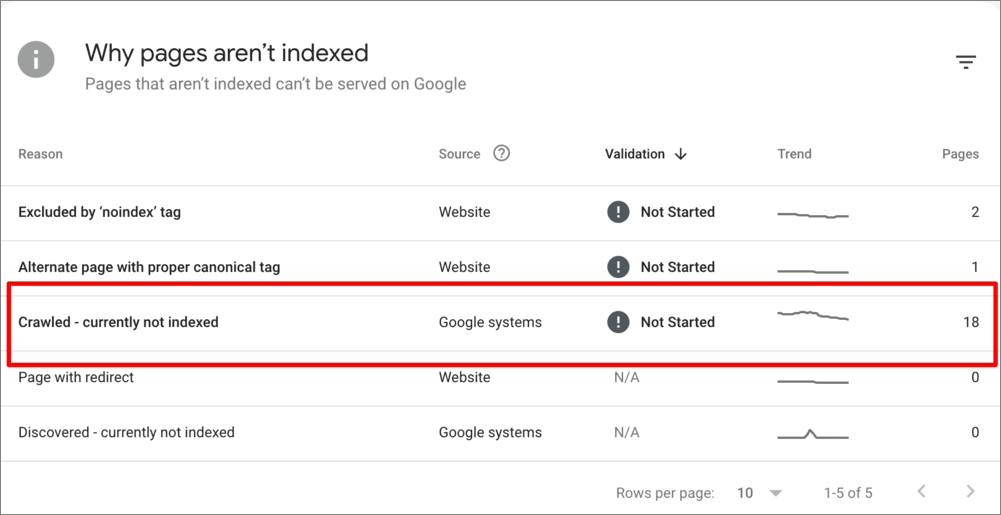
If I see that a key page is “Crawled – currently not indexed” or flagged with an error, that becomes a priority fix. Sometimes the solution is as simple as removing a noindex tag or improving internal links so Google can find the page more easily.
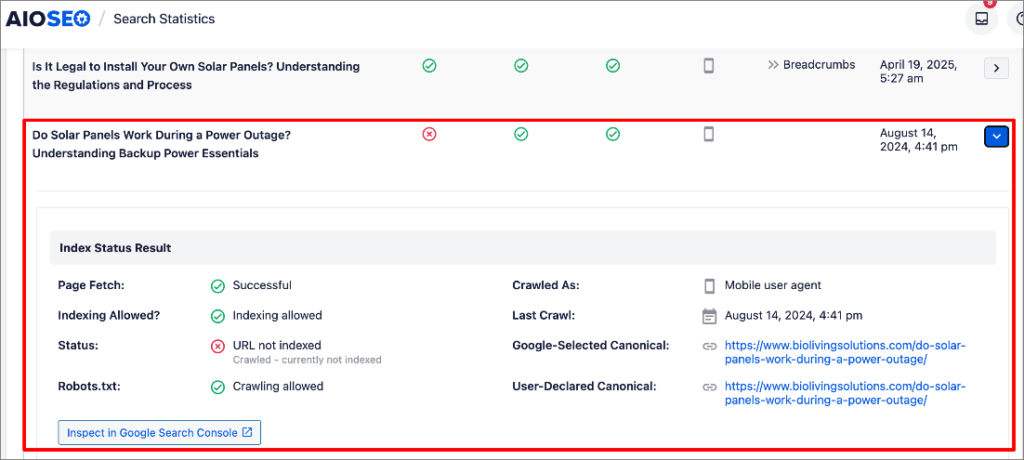
Pro Tip: WordPress users, you’re in luck. All in One SEO (AIOSEO) is an SEO plugin that checks which of your posts have been indexed (and those that haven’t). Search Statistics gives you real-time indexing statuses right in WordPress.
How to Choose the Right SEO KPIs for Your Business
Not every website should track the exact same KPIs.
A local plumber, a B2B SaaS, and an affiliate blog all care about different outcomes. The goal is to pick a small set of KPIs for SEO that match how you actually make money.
I like to work backwards from the business model.
1. Start With Your Main Goal
Ask yourself one simple question: “What do I want SEO to do for my business in the next 6–12 months?”
For most sites, the answer is one of these:
- Get more qualified leads
- Get more online sales
- Get more email subscribers or free trials
- Build authority and grow traffic in a niche
Once you’re clear on the main goal, your core SEO KPI becomes obvious:
- Leads? → Track organic form fills, demo requests, or calls.
- Sales? → Track revenue or transactions from organic traffic.
- Email/trials? → Track signups from organic.
- Brand/authority? → Track organic traffic and rankings to key pages.
Everything else is there to support that main KPI, not replace it.
2. Match SEO KPIs to Your Type of Site
Here’s a simple way to choose KPIs based on what you run:
For service businesses (agencies, consultants, local services):
- Primary KPI: leads from organic (forms, calls, bookings)
- Supporting KPIs: organic traffic, rankings for service keywords, CTR
For SaaS/B2B companies:
- Primary KPI: signups or demo requests from organic
- Supporting KPIs: organic traffic to product and feature pages, rankings for core “problem” and “solution” keywords
For content/affiliate sites:
- Primary KPI: revenue or clicks to partners from organic
- Supporting KPIs: organic traffic, rankings for money pages, CTR
This way, you’re not drowning in numbers. Each SEO KPI has a clear job.
3. Keep Your KPI Set Small on Purpose
It’s tempting to track everything. I’ve done that, and it usually leads to confusion.
Instead, I recommend:
- 1–2 primary SEO KPIs (the “money” metrics)
- 3–5 supporting KPIs (traffic, rankings, CTR, index coverage, etc.)
If a metric doesn’t help you make a decision, it doesn’t need to be a KPI.
4. Use Tools to Stay Focused (Where LowFruits Fits In)
Analytics tools tell you what happened. Tools like LowFruits help you decide what to do next to move those KPIs.
For example, if your KPI is organic traffic, LowFruits helps you find low-competition keywords where you can realistically grow that traffic.
Imagine you have an eCommerce website for pet supplies and want to increase traffic for dog food. You would start with the seed keyword “dog food” in the KWFinder tool.

After searching your desired term, you’ll get a keyword report.

From here, I recommend paying particular attention to the following 3 metrics:
- SERP Difficulty Score (SD): This measures the keyword difficulty. 1 is easy, 2 is medium, and 3 is hard.
- Weak Spots: These are low-authority competitors ranking in the top 10 search results. (The more Weak Spots there are, the easier it will be to rank high for that term.)
- Search Volume: After filtering by low SD scores and multiple Weak Spots, prioritize your keywords by search volume. (Click the volume column’s title to sort in descending order.)
This process will reveal high volume, low difficulty keywords that are ideal for increasing your traffic.

How to Track & Report on SEO KPIs
Once you’ve picked your main SEO KPIs, the next step is to track them. You don’t need a complex dashboard to start, just a basic setup and a routine.
Here’s a simple process you can follow.
1. Set Up Your Core Tools
You’ll need the following essentials:
- Google Analytics – to track traffic and conversions
- Google Search Console – to track rankings, CTR, and indexing
- An SEO tool like LowFruits – to find new keyword opportunities and guide what to do next
If you don’t have Analytics or Search Console set up yet, do that first. Both are free and give you most of the data you need. (There are a lot of tutorials online.)
2. Define Your Main Conversions
Next, make sure Analytics knows what a “win” looks like for you.
Use any of the examples discussed in Step 2 of our previous section, “How to Choose the Right SEO KPIs.” Here’s a quick refresher:
- For service businesses: contact form submissions, quote requests, booked calls
- For SaaS/B2B: free trial signups, demo requests
- For content/affiliate sites: clicks to partners, email signups
Set these up as events in Google Analytics. That way, you can see which traffic from SEO actually leads to results, not just visits.
3. Create a Simple KPI Sheet
You don’t need a fancy report. A simple spreadsheet works well and is easy to update monthly.
Include columns like:
- Month
- Organic sessions (from Google Analytics)
- Conversions from organic (and conversion rate)
- Average position for a handful of core keywords (from Search Console)
- Notes (big content changes, Google updates, etc.)
This lets you see trends at a glance instead of getting lost in daily ups and downs.
4. Check Your KPIs on a Schedule
SEO changes slowly, so you don’t need to check numbers every day. I usually:
- Scan weekly for any major drops or spikes
- Review in detail monthly and update my KPI sheet
During the monthly review, I ask:
- Is organic traffic going up, flat, or down?
- Which pages bring in the most organic conversions?
- Did any important rankings move significantly (up or down)?
- Are there new queries or topics showing up in Search Console?
This keeps you aware of what’s working, without getting overwhelmed.
5. Use LowFruits to Monitor Ranking Position Changes
Once you know which keywords and pages matter most, LowFruits becomes very useful for tracking how your rankings shift over time.
Here’s how I like to use it:
I start by adding my most important keywords to the Rank Tracker.

Then, I wait for LowFruits to gather ranking data from Google. Once it’s collected your ranking positions, you’ll get a report that looks like this:
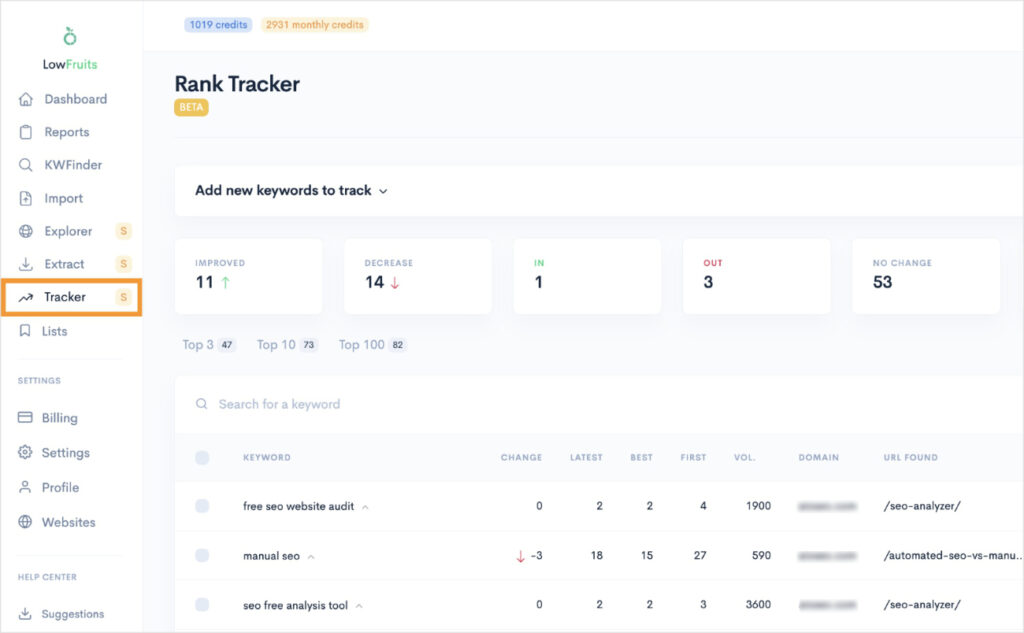
I like to review the top statistics (Improved, Decreased, In, Out, and No Change) weekly. This gives me a quick understanding of how my rankings have changed over the past 7 days.
If there’s a keyword I want to investigate further, I’ll click it to see how it’s ranking position has evolved over time. This helps me spot trends and determine if I need to revise my content strategy.

Pro Tip: If you see your keyword trending downward, look at the top search results for that query. LowFruits conveniently puts this information directly in the Rank Tracker, so you can visit competitors’ content without having to perform a manual Google search. By looking at their pages, you can see if the search intent has changed and if you need to update your page.
By watching these ranking movements alongside your KPIs in Analytics and Search Console, you can see a clear cause-and-effect:
6. Share Clear, Simple Reports (If You Need To)
If you report to a client, boss, or partner, keep it simple. Instead of flooding them with charts, focus on:
- 1–2 main KPIs (for example: organic leads and organic traffic)
- A short summary: what improved, what didn’t, and why
- A brief plan: what you’ll do next based on the data
That way, SEO doesn’t feel like a mystery. It becomes a clear, ongoing process: track → learn → adjust.
Common Mistakes People Make With SEO KPIs
Even when people know they should track SEO KPIs, they often fall into the same traps. These mistakes make the numbers confusing—or worse, useless.
Here are a few things I see all the time, and how to avoid them.
Mistake 1: Tracking Too Many Metrics
It’s easy to get excited and try to follow every number in every tool. The problem is, you end up with a dashboard full of data but no clear story.
If everything is a KPI, nothing is.
Fix: Pick 1–2 primary SEO KPIs and 3–5 supporting metrics, then ignore everything else for now. Review them on a set schedule (monthly works well) so you stay focused on what really matters.
Mistake 2: Focusing Only on Traffic
Watching organic traffic go up feels good, but traffic alone doesn’t pay the bills.
I’ve seen sites double their traffic and still not see more leads or sales, because they were chasing the wrong keywords. That’s why conversions from organic search should almost always be one of your core SEO KPIs.
Fix: Always track at least one conversion-based KPI from organic traffic (leads, sales, signups). Use that number to judge whether new content or optimizations are actually helping your business, not just boosting visits.
Mistake 3: Changing Strategy Too Quickly
SEO is slow. It can take weeks or even months for changes to show up in your KPIs.
A common mistake is to rewrite pages, switch topics, or change direction every time you see a small dip. This makes it hard to know what actually worked.
Fix: Give changes at least 4–8 weeks before you judge them, unless there’s a clear technical issue. Look at trends over time, not daily swings, before you decide to rewrite or replace content.
Mistake 4: Ignoring Search Intent
Another trap is picking keywords only because they look good on paper—decent search volume, “easy” difficulty—without thinking about what the searcher really wants.
If your page doesn’t match the intent behind a keyword, it won’t rank well or convert, no matter how much you optimize it.
When I use LowFruits, I always look at the SERP to see what type of pages already rank:
- Are they how-to guides?
- Product pages?
- Comparison posts?
That tells me what kind of content I need to create if I want my KPIs to improve.
Fix: Before targeting a keyword, Google it and study the top results to see what searchers expect. Make sure your content type (guide, comparison, product page, etc.) matches what’s already ranking.
Mistake 5: Not Connecting KPIs to Action
KPIs should lead to action. If you look at your numbers and don’t change anything, they’re just trivia.
Every time you review your SEO KPIs, ask:
- What’s working that I can do more of?
- What’s underperforming that I should fix, update, or replace?
For example:
- If a post gets lots of traffic but no conversions → improve the offer or call to action.
- If rankings stall on page 2 → use LowFruits to find related keywords you can add, or improve the content to beat current results.
When you connect KPIs with clear next steps, SEO becomes much easier to manage and easier to justify.
Fix: Each time you review your KPIs, write down 1–3 specific actions you’ll take based on what you see. For example, update underperforming pages, strengthen internal links, or use LowFruits to find easier keywords to target next.
Turn Your SEO KPIs Into Real Growth
Tracking SEO KPIs isn’t about staring at charts. It’s about knowing which numbers matter, watching how they change over time, and using that information to make smarter decisions.
When you:
- Choose a few clear KPIs for SEO
- Connect them to real business goals (leads, sales, signups)
- Review them on a regular schedule
- Adjust your content and strategy based on what the data shows
SEO stops feeling random and starts becoming a repeatable process.
I hope you found this article helpful. For next steps, I suggest reading up on SEO benchmarks to track and how to build a winning keyword strategy. You can also check out my picks for the best SEO tools for small business that don’t break the bank.
FAQs About KPIs for SEO
What are SEO KPIs?
SEO KPIs are the key performance indicators you track to measure how well your SEO is working. They show if your site is getting more visitors from search, ranking higher in Google, and turning that traffic into leads, sales, or signups.
Why are SEO KPIs important?
Without SEO KPIs, it’s hard to know if your work is paying off. Tracking a few clear KPIs for SEO helps you see what’s working, what isn’t, and where to focus your time and budget to get better results.
What are the most important SEO KPIs to track?
For most sites, the most important SEO KPIs are:
- Organic traffic
- Keyword rankings for core terms
- Click-through rate (CTR) from search
- Conversions from organic traffic (leads, sales, or signups)
These 4 metrics give you a good picture of visibility, interest, and real business impact.
How do I choose the right SEO KPI for my business?
Start with your main goal: do you want more leads, more online sales, or more email signups? Pick 1–2 primary SEO KPIs that match that goal (for example, organic leads or organic revenue), then add a few supporting KPIs like rankings and traffic to help you understand why those results are changing.
How often should I review my SEO KPIs?
You don’t need to check SEO KPIs every day. A quick weekly scan is enough to catch major changes, and a deeper monthly review works well for spotting trends and deciding what to improve next.


