
Most people pick the wrong keywords.
Everyone chases high volume, but that’s the fastest way to fail in search engine optimization (SEO). The true SEO game isn’t about volume; it’s about choosing the right battles—keywords you can realistically rank for, and that bring traffic ready to convert.
Without a proven system for picking keywords for SEO, you risk wasting valuable time and resources on terms you’ll never rank for, or terms that bring low-value traffic that doesn’t convert.
I’ll share the proven 4-step system I use to select profitable, low-competition keywords that align with your business goals and build authority. This system moves you past guessing and starts building a calculated, high-performing content portfolio.
In This Article
The Core Criteria: 3 Pillars of Keyword Selection
Before you even start considering search volume, you need to filter your initial ideas against certain criteria. These pillars determine whether a keyword is a smart investment of your time.
1. Search Intent (The “Why”)
This is the most critical factor when picking keywords for SEO: What is the user trying to accomplish right now?
Google’s primary goal is to satisfy the user’s intent. If your content doesn’t deliver the exact type of page the user is looking for, you won’t rank, even if you execute everything else perfectly.
There are 4 primary types of search intent:
- Informational (Learning): The user wants to learn something, find an answer to a question, or understand a concept (e.g., “how to start a blog,” “what is an algorithm”). The content format here should be guides, tutorials, or long-form articles.
- Transactional (Buying): The user is ready to buy a specific product or service immediately (e.g., “buy minimalist wallet,” “Apple discount code”). The content format must be a product page, service page, or checkout page.
- Commercial Investigation (Researching): The user is gathering information before making a purchase decision (e.g., “best rank tracking tool review,” “iPhone 16 vs. Samsung S25”). The format should be comparison reviews, listicles, or detailed buyer’s guides.
- Navigational (Finding): The user is trying to get to a specific website or brand’s page (e.g., “Facebook login,” “LowFruits pricing”).
Actionable Tip: Always match your content format to the dominant intent of the search engine results page (SERP). If the top 10 results are all listicles, you should also write a listicle. If they’re all product pages, your best bet is a product page.
2. Keyword Difficulty (The “Can I?”)
Keyword difficulty (KD) is a metric provided by SEO tools that estimates how hard it will be to rank on the first page of Google for a given term. They’re crucial for a realistic assessment of competition.

While every SEO tool estimates KD differently, you should focus on low-difficulty keywords to have the best chances of ranking in the top 10 search results. This is especially true if you have a new website or small business.
I recommend LowFruits for investigating keyword difficulty because it looks at more than just KD scores. You also get the following metrics:
- SERP Difficulty Score (SD): This look at the difficulty of the first page as a whole. A 1-score is easy to rank for, while 3 is hard.
- Weak Spots: Each icon represents a low-authority domain. These are competitors you can outrank with the right content.

It’s a super beginner-friendly way to perform a SERP analysis—no manual Google checking required.
Ultimately, targeting these less-competitive areas is how new or growing sites gain momentum.
3. Business Value (The “Should I?”)
Finally, consider how close the keyword is to generating revenue.
Don’t chase only high-volume informational keywords if your primary goal is sales. (Will give you an example about when to do this later.)
Prioritize terms that solve a high-value problem for your core customer, shorten the buyer’s journey, or lead directly to a transactional intent page.
This way, your content does more than just bring visitors to your site; it gets them to convert.
My 4-Step System for Picking Keywords for SEO
The pillars above give your keyword strategy a solid foundation.
Now, you can follow this 4-step process to find the right keywords for your website.
Step 1: Build a Seed List (Brainstorming)
The first step in how to pick keywords for SEO is casting a wide net to generate ideas. Think of this as the raw material before you start filtering.
Here are some different ways you can come up with seed keywords (the terms you type into keyword research tools):
Look at Internal Data First
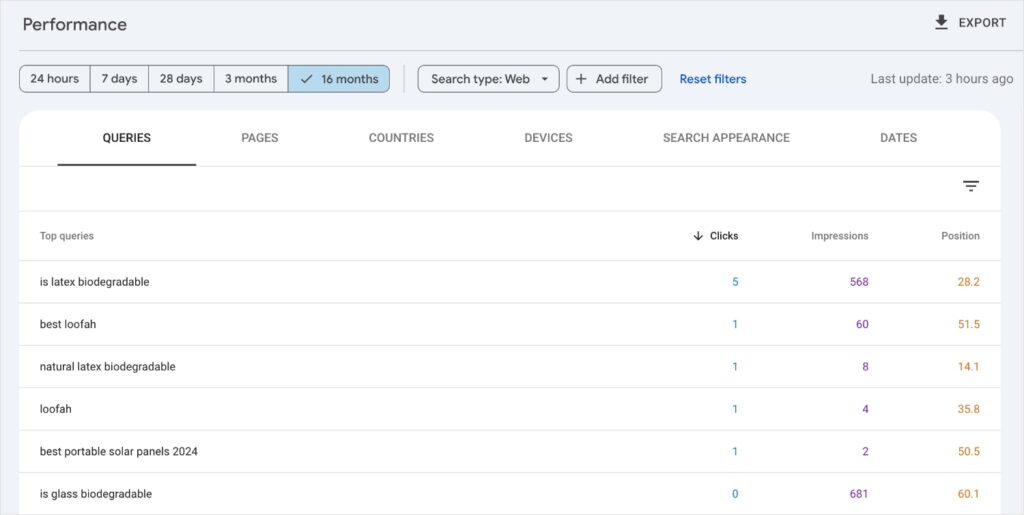
Start with your existing Google Search Console (GSC) data.
Navigate to Performance reports and select the Queries tab. This will give you a list of keywords your website is already ranking for.
Look specifically for queries where your pages are receiving impressions but have either:
- A low click-through rate (CTR) or
- A high ranking position (e.g., position 20-50)
These are terms Google already associates with your site and are perfect for targeted content refreshes.
Add these terms to a seed keyword list.
Check Out Google Suggestions
Some of the best keyword ideas come straight from the source—Google.
I like to look at Google Autocomplete suggestions before diving deep into my keyword research.
To use this feature, just start typing a query related to your business but don’t press enter.
Google will autopopulate searches that start with your text.

You can also look at the “People Also Ask” (PAA) section of search results. This area provides specific questions users have related to the initial query.
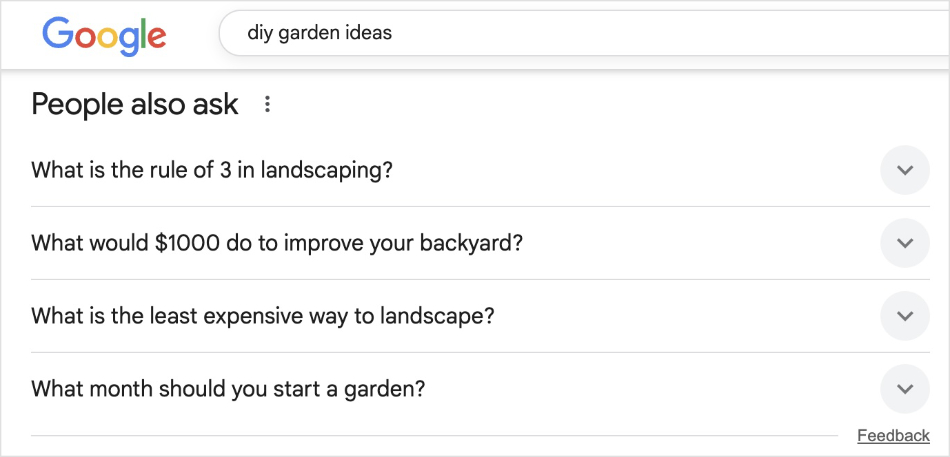
These features reveal exactly what people are searching for in real-time and provide excellent long-tail keyword ideas.
Take all your findings and add them to your ongoing list of seed keywords.
Think About Your Niche
At this point, you should have a large list of seed keywords (broad, relevant terms like “minimalist wallet” or “coffee brewing”).
This gives you the core topics relevant to your business or niche.
Continue adding to it until you feel you have covered all your business’s most important bases. (For solopreneurs, I’d say 25–40 keywords. For small to mid-size teams, 40–80 keywords. Bigger companies and agencies will have more comprehensive seed keyword lists.)
Step 2: Analyze Competition (Finding Your Easy Wins)
This is where you’re going to use a keyword research tool to see how likely you’ll rank in the top 10.
For this step, I like to use LowFruits because of the reasons I mentioned earlier (more helpful metrics and beginner-friendly). However, you can also use tools like Semrush and Ahrefs if you already have an account.
So, at this stage, we’re looking for quantifiable signs of weakness. This means easy competitor targets and high chances of ranking in top positions.
To do this, you’re going to start by entering one of your seed keywords from the previous step into your chosen tool. (For this tutorial, I’m using the LowFruits KWFinder.)

Then, you’re going to pay special attention to the following columns:
Are the right columns empty in your report? Don’t worry! It just means you need to analyze the SERPs. Just check the box to the left of the keyword you want to analyze and click the SERP Extract button. (1 keyword analyzed = 1 credit)
As we discussed earlier, these columns represent SD scores and Weak Spots.
Now, what we want to do is add filters so we only see easy keywords.
First, we’ll set the SD filter to a max of 1. Click Apply.

Then, we’re going to open the Weak Websites filter and set the min to 2.

Thanks to these two simple filters, you now have keywords with low-difficulty and multiple Weak Spots.

Pro Tip: Click on the search volume (Vol.) column to sort your report in descending order. This will put your highest volume keywords first, helping you prioritize which to target.
The bottom line: If low-authority sites are ranking on page 1, you have a solid chance to outrank them.
Step 3: Filter by Intent (Qualifying the Search)
When you do keyword research, you’re going to get a lot of keywords. And the reality is that many won’t align with your business goals.
The job of step 3 is to quickly qualify keywords by their search intent.
This will help you match your content to what users (and search engines) want and align your content strategy with your business objectives.
In summary: You’re going to do a quick SERP analysis to see if a keyword is worth targeting or not.
How to Do This in LowFruits:
When you’re in your keyword report, click View the SERP next to the keyword you’re interested in.

This will open a pop-out window of the top 10 search results for that keyword.

Now, analyze these results. Are they product pages, guides, videos, or comparison tables?
If you see a majority of one format, that is the dominant intent you must satisfy.
In the above example, every result is a guide. This means the keyword has information intent (users want to learn something), and we should creating something similar.
Now, you might be wondering, “If my business goal is to make sales, why would I waste time on an informational piece?”
That’s a fair question.
A guide on tulips won’t necessarily directly translate to more bouquet sale for a florist. However, you must cater to your audience and their needs. This means you’ll need to write informational content at times, even though they don’t have the best conversion rates.
Overall, keeping users on your site is the goal. And, this visitor could come back to your site one day to make a purchase now that they’ve been exposed to your brand.
By giving them content they want, you’ll reduce bounce rates and improve engagement metrics, which are important Google ranking factors.
Don’t have LowFruits? You can also do a SERP analysis by performing manual Google checks. Just enter your keyword and investigate the top results. The drawback to this method is that you can only do 1 keyword at a time, making it much more time-intensive.
Step 4: Map & Assign (Execution)
This final step turns your keyword list into an actionable strategy.
The goal here is to document your decisions and commit keywords to specific pages on your website.
Here’s what you’re going to do:
- Assign Primary Keywords: Every single URL should have 1 focus keyword. This is the main query you want to rank for. You’ll use this keyword to optimize your page’s H1 tag, URL slug, and core content around.
- Identify Secondary Keywords: Use the long-tail variations and sub-topics you found in earlier steps as related keywords. These are used naturally throughout the content (in H2s, H3s, and body copy) to increase relevance and capture broader traffic.
- Create a Content Blueprint: Log all your keywords in a central spreadsheet or project management tool. Include the URL, the focus keyword, the search intent, and the supporting keywords. This map is vital for preventing keyword cannibalization and for ensuring every piece of content has a unique purpose.
- Avoid Keyword Overlap: Before publishing, check your content blueprint to ensure your new focus keyword isn’t already assigned to another URL. If it is, you need to go back to Step 2 or Step 3 and find a more unique term.
It’s quite a few steps, but the good news is that LowFruits can automate the entire process for you.
The Keyword Clustering Tool organizes related keywords into clusters, so you can target queries with shared intent on the same web page.
To use this tool, simply navigate to the Clusters tab of any keyword report. This list will show your focus keywords and the amount of related keywords within each cluster.

You can click on any of these results to see the individual keywords within that group.

LowFruits puts topic clustering on autopilot, so you can get the same results as the earlier mentioned manual process—in less time.
You can use these clusters to creat an entire content strategy in literal minutes.
Check out this beginner-friendly guide on how to create topic clusters.
SEO Success Is in the Keyword Selection
Choosing the right keywords isn’t about luck. It’s a strategy that anyone can learn.
I hope this article helped you learn how to pick keywords for SEO. Remember to look at search intent, keyword difficulty, and how it aligns with your business.
If you target keywords that align with your goals and content, you’ll find yourself ranking higher and faster.
For more articles like this, check out our beginner’s guide to on-page SEO and 15 SEO best practices that really work.
You can also find us on Twitter (X) and Facebook to stay up to date on the latest trends in SEO and keyword research.
FAQs About Picking Keywords for SEO
How do you choose keywords for SEO?
To choose keywords for SEO, you’ll want to focus on low difficulty scores and weak competitors in SERPs. This type of keyword is easier to rank for and helps you capture one of the top 10 positions in search results. Be sure to check the keyword’s search intent before creating content to give yourself the best chance of ranking high.
What are the 4 types of keywords for SEO?
SEO keywords are categorized by search intent, which represents what a user wants to achieev when performing a search. The 4 types of search intent are informational (seeking answers), commercial (researching products), transactional (ready to buy), and navigational (seeking a specific site).
Which keyword is best for SEO?
There isn’t a “best” keyword for SEO. However, you can follow specific best practices to find good SEO keywords for your website. Some things to consider are the keyword’s difficulty, competitiveness in SERPs, and business value (i.e., does it align with your business goals). In general, it’s best to target long-tail keywords because they convert better than broad, high-volume terms.
How do I find my SEO keywords?
You can find your existing SEO keywords by analyzing your Google Search Console Performance report. You can also use keyword research tools to see what keywords your website is ranking for and expand your list.


